Chargehub EV & Tesla Charging
- 4.7
- Rating
- 100.00K
- Installs
- Free
- Price

 Analysis by App-foxy
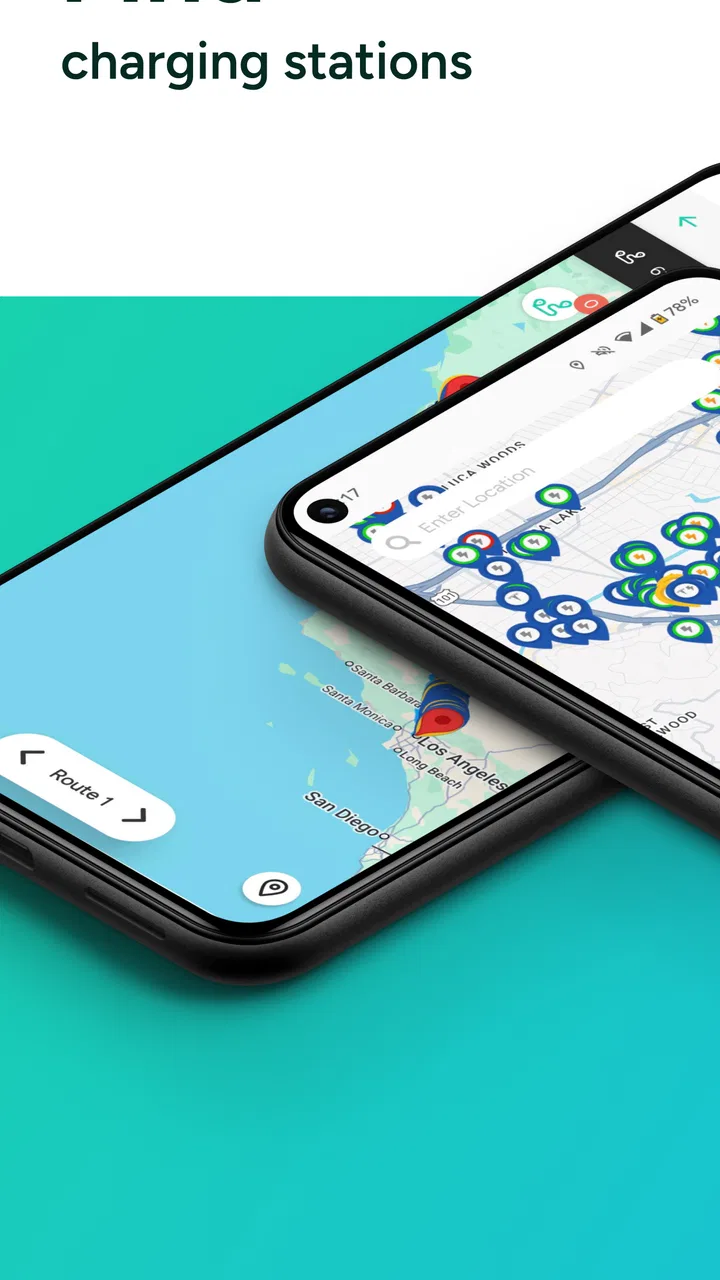
Finding a public charger is easy when everything is working perfectly. The difficult part starts when the battery is low, the parking lot is unfamiliar, and the first station you find is occupied, incompatible, or not behaving as expected. That is where Chargehub EV & Tesla Charging becomes useful. I see it as a practical map for drivers of electric vehicles and plug-in hybrids who want more charging choices than the route planner built into their car normally shows.
What I like most is the app’s broad purpose: it brings charging locations for different EV and PHEV models, including Tesla, into one place. That makes it more useful for mixed households, borrowed vehicles, road trips, and drivers who do not want to depend on a single charging network. It is a free app in the Maps & Navigation category, developed by Mogile Technologies, with an average rating of 4.7 from around 8K ratings. Those figures suggest a well-established tool, but they do not remove the need to check each station carefully before driving there.
Where the real friction begins
The first obstacle is often not the map itself. It is knowing what the map result actually means for the car and the trip. A station can appear close by and still be inconvenient because the connector, charging speed, access conditions, or current availability do not suit the situation. I would not treat a nearby pin as a guarantee that charging will be possible immediately.
You May Also Like

 Google Keep - Notes and lists
Google Keep’s Quiet Growth Shows the Appeal of Simpler Notes
As mobile work gets busier, Google Keep keeps winning a simple contest: capture a thought quickly, find it later, and get on with the day.

 Blood Strike: 2.5 Anniversary
Blood Strike’s Loadouts Turn Every Drop Into a Tactical Gamble
A close look at Blood Strike’s custom loadouts: how fast access to signature weapons reshapes its battle royale rhythm, rewards preparation, and narrows the gap between fights.

 Pandora - Music & Podcasts
Pandora’s Music Is Easy to Start, but Harder to Recover
Pandora’s strength is its low-effort path from a seed to a station. Its weak spot is how much confidence it asks you to place in connection, setup, and quiet recovery.

 8 Ball Pool
 Is Built on Rivalries, Rematches, and Routine
A close look at the rivalries, rematches, shared routines, and unanswered safety questions that turn a quick pool match into a persistent mobile community.

 Samsung Music
’s Quiet Strength Is Playing What You Already Own
Its reach comes less from spectacle than from dependable access to a personal library. That simplicity is both the app’s strongest retention engine and its ceiling.

 AccuWeather: Weather Radar
AccuWeather Review: A Quick, Clear Forecast for Everyday Decisions
For everyday plans, the best forecast is the one you can understand quickly. AccuWeather makes rain timing, radar, and local conditions easy to act on, with a few trade-offs.
More From Our News Desk



My safest habit is to use the app in two stages. First, I look broadly for possible stations along the route or near the destination. Then I narrow the choice by checking the vehicle compatibility and the practical details shown for that location. This prevents the common mistake of choosing the shortest walking distance instead of the most dependable charging stop.
Drivers moving between brands may appreciate the app more than owners who always use one familiar network. A Tesla driver, a plug-in hybrid owner, and someone driving another EV can approach the same map with different requirements. The app’s all-model focus is therefore more helpful than a network-specific application when the main question is simply, “Where can I charge this car?”
There is also a mental trap with charging maps: people tend to plan around the closest station and ignore the backup. I recommend identifying a second option before leaving, especially on a long trip or when the remaining range is uncomfortable. The extra minute spent comparing alternatives can matter more than the time spent zooming in and out of the map.
Why a map is not the same as a reservation
Chargehub EV & Tesla Charging is best understood as a discovery and planning companion, not as a promise that a connector will be waiting. A map can help me locate a station, but the final experience still depends on the site, the charger, the vehicle, and the network involved. This distinction is important for anyone expecting the app to solve every part of a charging session.
For everyday driving, I would use it before leaving home rather than opening it only after the battery warning appears. A quick check can reveal whether the usual destination has alternatives nearby. It also gives me a chance to notice whether the preferred stop is in a shopping area, a parking facility, or another place where access may be less convenient than the map distance suggests.
The app is less suitable for a driver who wants one tightly integrated experience covering navigation, charging payment, vehicle status, and route prediction in one system. The built-in tools from a car manufacturer may be better for that kind of seamless trip planning. Chargehub’s strength is breadth and independence; its trade-off is that I still need to make some decisions myself.
Setup checks that prevent avoidable problems
Before relying on the app for a trip, I would start with a simple check of the phone and vehicle information. The application requires an operating system version of 11 or newer, so an older device may be the first reason it cannot be installed or used comfortably. On a supported phone, I would also make sure the app is updated through the normal store process and that the device has enough battery for the journey.
Next, I would confirm the car model and charging needs mentally before searching. A plug-in hybrid often has different expectations from a full EV, while Tesla drivers may need to distinguish between locations that appear in the same broad charging landscape. The useful question is not just whether a station is labeled for an electric vehicle, but whether it fits this particular car and this particular stop.
When I search, I prefer to begin with the whole route rather than a tiny area around my current position. This makes it easier to compare clusters of stations and avoid planning a trip around one isolated result. After that, I inspect the destination area more closely. A station that looks ideal on a wide map may be less attractive once I consider the final approach, parking arrangement, or the distance from the place I am actually visiting.
My most important setup tip is to prepare a fallback before the battery becomes critical. I choose a primary station and then note another nearby or slightly farther option. If the first location is busy or unsuitable, I can change plans calmly instead of searching under pressure. This is a small workflow change, but it makes a map app much more valuable in real life.
How I would prepare for a first trip
For a new user, I would open the app while connected to a reliable network and search for charging near both the starting point and the destination. I would compare several results instead of selecting the first pin. The goal is to learn how the map presents stations and what information is available before the trip becomes urgent.
I would also leave room for the difference between the planned stop and the actual stop. A route can change because of traffic, a missed turn, or an unexpected detour. Keeping a reasonable battery margin is not an app feature, but it is the best protection against imperfect map information. The app can improve the decision; it cannot change the vehicle’s range or make a closed site available.
The free price makes this preparation easy to recommend to occasional EV drivers. At the same time, the app includes in-app purchases ranging from $3.29 to $29.99 per item. I would treat those purchases as optional considerations rather than assuming every user needs them. Someone who only needs to locate a charger occasionally may be satisfied with the basic experience, while a frequent driver should examine what an offered purchase adds before paying.
Because the content rating is Everyone, the app is approachable for a broad audience. That does not mean every charging situation is simple, though. New EV owners may still need to learn connector terminology, charging etiquette, and the difference between finding a station and starting a session. I would use the app as one part of that learning process, not as a substitute for understanding the car.
Recovering when the normal workflow breaks
When a station does not work as expected, I avoid immediately blaming the application. I first check whether the map has finished loading, whether the selected location is the intended one, and whether I accidentally chose a nearby result with a similar name. If the map seems stale or incomplete, closing and reopening the app, checking the connection, and searching again are sensible first steps.
If the station appears correctly but the charger is unavailable, the practical response is to move to the backup location I identified earlier. Repeating the same search without changing the decision usually wastes time. I would also compare the surrounding results at a wider zoom level, because a second option may be hidden when the map is focused too tightly on the original pin.
A useful recovery technique is to separate navigation failure from charging failure. If I can see the station but cannot get reliable directions from the app, I can use the location information with the phone’s normal navigation tool. If I reach the site and the charger itself is not usable, changing navigation apps will not solve that physical problem. Keeping those two issues separate makes troubleshooting faster.
Another non-obvious point is that a station’s map position may not show the best entrance. Large parking areas, shopping centers, and garages can have several access roads. I would look at the surrounding streets before driving into a complex, especially at night or when the battery is low. The app helps me identify the destination, but the final approach may still require ordinary street awareness.
A calm sequence for a failed charging stop
Confirm that the selected map result is the intended station and that the vehicle requirements match it.
Refresh the search or reopen the app if the map appears incomplete or unresponsive.
Check nearby alternatives instead of repeatedly attempting the same unavailable location.
Use the phone’s regular navigation tool if the problem is route guidance rather than station discovery.
Keep enough battery margin for the fallback, and avoid experimenting with an unfamiliar option when the range is already very low.
This sequence is deliberately simple. It does not assume that every station behaves the same way, and it does not pretend that a software refresh can repair a physical charger. The value of Chargehub in this situation is that it gives me a broader field of alternatives, which is often more useful than a single perfect-looking result.
When the app is not the cause
Charging problems can come from the vehicle, the cable, the station hardware, the local network, or access rules at the site. If the application shows a plausible location but the car will not begin charging, I would inspect the connection and the vehicle’s own charging indicators before changing the app. A map application can point me to a charger; it cannot correct a loose plug, a vehicle setting, or a hardware fault.
The same applies when a charger is occupied. A map may help me find another site, but it cannot control how long another driver stays connected. In busy areas, I prefer several candidate locations rather than one supposedly convenient stop. This is one reason I find the app more valuable for planning than for last-second rescue.
There is also a difference between information being old and information being wrong. Conditions can change after a location is mapped. Construction, parking restrictions, service interruptions, and local access hours can all affect the experience without reflecting a defect in the app. If a location repeatedly causes trouble, I would record that experience for my own future planning and rely on the surrounding alternatives instead of assuming every nearby result has the same issue.
Drivers who need guaranteed charging at a precise time may prefer a network’s own application or the vehicle maker’s integrated tools when those services offer more direct session handling. I would choose Chargehub when I need a wider view across charging options, especially before a trip or in an unfamiliar area. I would choose a specialized network tool when I already know the exact operator and need its account or session functions.
Who benefits most from this app?
I think it is a strong fit for new EV owners who are still building a mental map of local charging. It is also useful for people who drive more than one electric model in a household, travel outside their usual area, or occasionally borrow an EV. The broad vehicle coverage means the app can remain useful when the car changes, rather than forcing the user to learn a completely different map for every brand.
It is less compelling for someone who charges almost exclusively at home and rarely travels beyond familiar routes. That driver may open the app too infrequently to benefit from a separate charging map. It is also not my first choice for a person who expects the app to manage the complete charging transaction, predict the car’s exact range, and provide a fully automatic route without any manual checking.
With over 100K installs and a release history going back to June 29, 2012, the app has had time to become a recognizable option in this space. I would still judge it by the way it fits my routine rather than by its age or popularity. A well-used map is only helpful if I am willing to verify the station and keep a backup plan.
My practical verdict after using it
Chargehub EV & Tesla Charging earns its place on my phone because it addresses the messy part of EV travel: finding more than one possible place to charge across different vehicle types. I like the independence from a single car brand or charging network, and I find the map most helpful before a trip, when there is time to compare locations and prepare for failure.
Its main limitation is also clear. It cannot guarantee that a charger is free, operational, easy to enter, or perfect for the vehicle simply because it appears on the map. Users who understand that boundary will get more from it. I would verify compatibility, inspect the destination area, and save a fallback before setting off, particularly when the remaining range is modest.
The free entry point makes it worth trying for most EV and PHEV drivers, while the optional purchases deserve a deliberate look rather than an automatic upgrade. For me, the app is not a complete replacement for the car’s navigation or a charging network’s own tools. It is the broader planning layer I use when those usual options feel too narrow.
My recommendation is straightforward: install it if you want a cross-vehicle charging map and are comfortable making the final checks yourself. Skip it if your priority is a single integrated system that handles every part of the charging session. Used with a little preparation, it can turn a stressful “where can I charge?” moment into a manageable choice between several realistic options.
FAQs for Chargehub EV & Tesla Charging
01What is ChargeHub EV & Tesla Charging used for?
ChargeHub EV & Tesla Charging helps electric-vehicle drivers find public charging stations, compare available connectors and charging networks, view station details, and plan charging stops. It is particularly useful for locating compatible chargers during daily travel or road trips. The app can also provide information such as pricing, operating hours, amenities, and user-reported availability, although details may vary by location and network.
02Does ChargeHub support Tesla vehicles and Tesla Superchargers?
Yes, ChargeHub includes charging information relevant to Tesla drivers, but compatibility depends on the vehicle, connector, adapter, and charging network. Tesla owners should check the station’s connector type and access requirements before starting a trip. Some locations may be open only to certain Tesla models or require a Tesla account, adapter, or payment method, so the app’s listing should be confirmed before arrival.
03Can I start and pay for a charging session through the app?
In many cases, ChargeHub can help users access participating charging networks, initiate sessions, or review payment information, but the exact options depend on the station operator. Not every charger supports payment or activation through ChargeHub. Some stations may redirect you to the operator’s app, require an RFID card, accept contactless payment, or use a separate account and pricing system.
04How accurate is the charger availability information in ChargeHub?
ChargeHub can display station status and availability when the charging network shares live data, while other listings may rely on recently reported information or community updates. Conditions can change quickly because a charger may become occupied, malfunction, or be reserved after the map was refreshed. For important trips, verify the station status shortly before arrival and consider identifying a nearby backup charger.
05Is ChargeHub EV & Tesla Charging free to download and use?
The app is generally available to download without an upfront purchase, but charging itself is not free and station operators set their own rates. Costs may include energy usage, session fees, parking charges, idle fees, or subscription requirements. Depending on the feature and network, ChargeHub may also offer optional paid services or handle payments under the operator’s terms, so review pricing before charging.
Pros
- Covers many public EV charging networks in one app.
- Shows charger availability
- pricing
- and connector details.
- Trip planning helps locate charging stops along a route.
- User reviews can highlight broken or inaccessible stations.
- Supports payment and charging access at selected locations.
Cons
- Station data may be outdated when chargers change status.
- Coverage and features vary significantly by location.
- Some stations require separate network accounts or apps.
- Pricing information is not always available or fully accurate.
- The interface can feel crowded when many chargers appear nearby.

Chargehub EV & Tesla Charging
Gallery